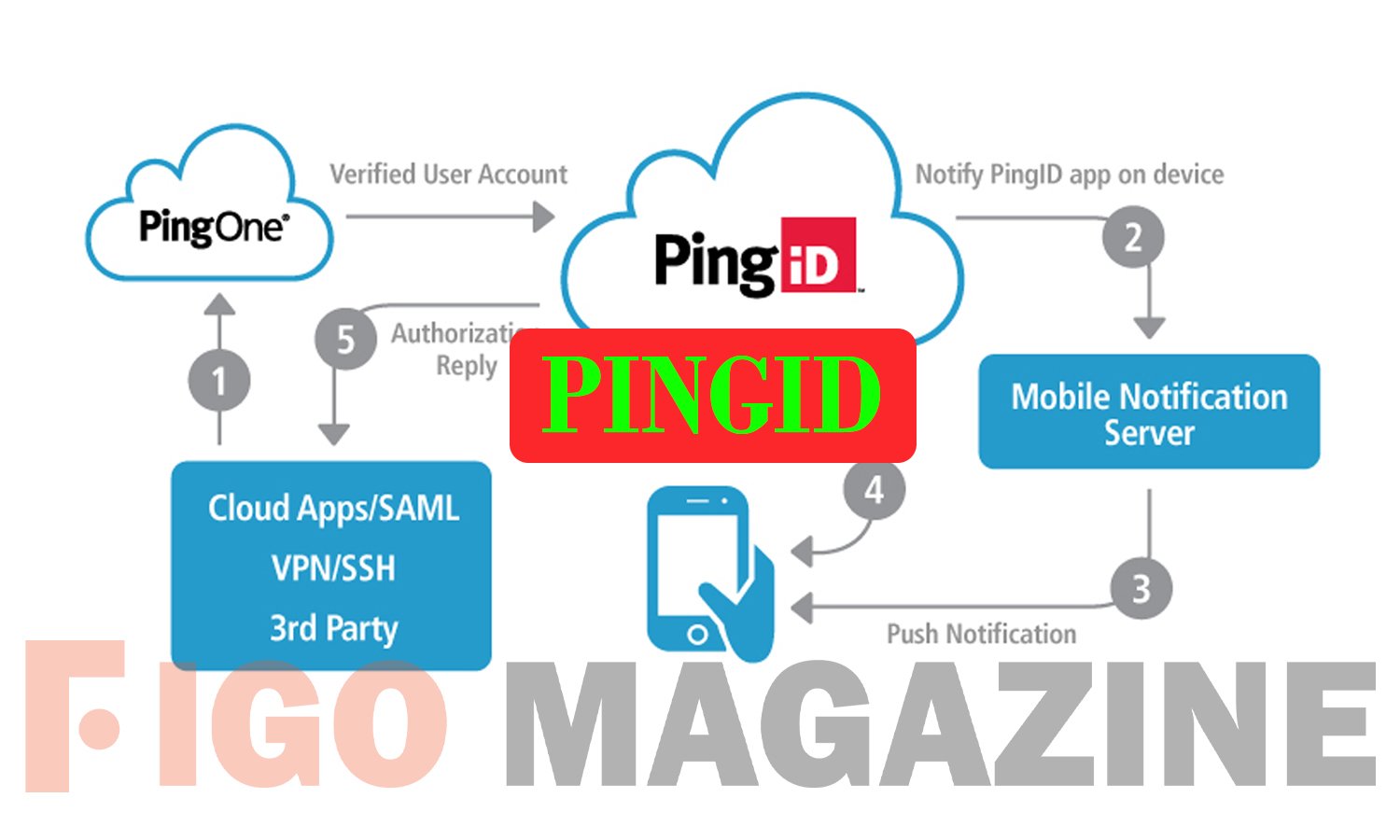
PingID is a multi-factor authentication (MFA) app from Ping Identity that helps you log in to your work accounts in a safe and simple way. Instead of trusting only a password, PingID asks you to confirm your identity in a second way, such as a tap on your phone, a short code, or your fingerprint. This extra step blocks most hackers, even if they steal your password. Millions of employees around the world use it every day to protect company data. In this guide, you will learn what PingID is, how it works, its main features, and how to set it up.
What Is PingID?
PingID is a cloud-based MFA tool built by Ping Identity, a well-known identity security company founded in 2002 and based in Denver, Colorado. The app adds a second layer of proof when you sign in, so your account stays safe even if someone knows your password. MFA is also called two-factor authentication (2FA) or two-step verification.
Companies use PingID to protect email, business apps, VPNs, and cloud services. It works on both iPhone and Android phones, and it also comes as a desktop app for Windows and macOS. Because it is part of the larger PingOne cloud platform, PingID fits well with the other security tools that many businesses already use.
How Does PingID Work?
The idea behind PingID is simple. First, you type your username and password as normal. Then the app asks you to prove that it is really you. Most people get a push notification on their phone and just tap “Approve” to finish signing in.
If you cannot use a push notification, PingID gives you other choices. You can enter a one-time code, scan a QR code, or use your fingerprint or face. It even has an offline mode, so you can still log in when your phone has no internet or signal.
Key Features of PingID
PingID offers many ways to confirm your identity, which makes it flexible for different needs. Its main options include:
- Mobile push: Tap “Approve” on your phone to sign in fast.
- One-time passcodes (OTP): Get a short code by app, text (SMS), or email.
- Biometrics: Use your fingerprint or face for quick access.
- QR codes and security keys: Scan a code or use a physical key like FIDO2.
- Offline mode: Log in even without an internet connection.
These choices let each company pick the methods that match its security rules. You can also use the app as an authenticator for personal accounts, such as Google, Facebook, or PayPal.
How to Set Up PingID
Setting up PingID is quick and easy. Download the free app from the Apple App Store or Google Play. Your employer will then give you a QR code or a setup link to connect your account. Scan the code with the app, and your device pairs in a few seconds.
After that, the app is ready to use. Whenever you log in to a work app, a request appears on your phone. It is smart to add a backup method too, like email or a second device, so you can still sign in if you lose or replace your phone.
Why Do Companies Use PingID?
Passwords alone are weak because people reuse them or pick simple ones. PingID solves this problem by adding a second check that is very hard to fake. This helps companies stop data theft, meet security rules, and support “zero trust” and passwordless plans.
The app is also easy on employees. The one-tap approve flow saves time, and adaptive security only asks for extra proof when a login looks risky. This balance of strong safety and low effort is why so many large organizations choose it.
Is PingID Safe?
Yes, PingID is a trusted, enterprise-grade security tool used by banks, hospitals, and governments. It relies on strong encryption and modern standards to keep your logins private. Your company, not Ping Identity, controls your account, which adds another layer of care.
One thing to remember is that Ping Identity cannot reset your account, unlock it, or send you a new QR code. If you get locked out or lose your phone, you must contact your own company’s IT help desk for support.
Conclusion
PingID is a simple and reliable way to keep your work accounts safe. With one quick tap or code, it stops most attacks that passwords alone cannot. If your job uses it, setup takes only a minute and gives you strong, everyday protection.
Frequently Asked Questions
1. Is PingID free?
Yes, the app is free to download. Your employer pays for the business service behind it.
2. Can I use PingID on more than one device?
Yes. If your company allows it, you can add a backup device or method in case you lose your phone.
3. What should I do if I get a new phone?
Use your backup method to sign in, then pair the new phone. If you get stuck, contact your company’s IT team.
4. Does PingID track my location?
Some companies turn on location to spot fake logins. The app only uses it to verify identity, not to follow you.
5. Who do I contact if I am locked out?
Only your organization’s IT help desk can help. Ping Identity cannot access or reset your account.
Discover your next great read at Figgo Magazine.